
Respuesta directa En Snapchat se liga entrando por las historias (comenta algo concreto, no un fuego suelto), alternando snaps ligeros con chats de sustancia y usando la racha como excusa de contacto diario — no como única aportación. Dos reglas propias que no existen en otras apps: los mensajes desaparecen al leerse y Snapchat sí notifica las capturas de pantalla, así que actúa siempre como si la otra persona fuera a enterarse. Porque se va a enterar.
Por qué Snapchat funciona para ligar sin ser una app de citas
La ventaja de Snapchat es la ausencia de marco: nadie está oficialmente “buscando”, así que todo flirteo parece accidental y la presión de Tinder no existe. Se empieza respondiendo una historia, se sigue con snaps del día a día y, sin que nadie lo declare, hay contacto diario y bromas internas. Esa gradualidad es oro — y también la trampa: sin intención, te quedas para siempre en la zona de colega de racha.
Snaps vs chats: cada uno tiene su función
El error de base es tratar Snapchat como WhatsApp con filtros. Aquí hay dos canales con papeles distintos:
- Snaps (foto/vídeo): presencia y contexto. Enseñan tu vida sin exigir respuesta elaborada. Un snap con caption que invita a contestar (“esto está a un 6, mejora tu plan”) es medio opener.
- Chats (texto): conversación real. Es donde se construye algo, pero recuerda que desaparecen al leerse salvo que alguien los guarde — y ambos veis qué se guarda.
- Respuestas a historias: la puerta de entrada estándar. Concretas y con algo que decir; el emoji suelto se ignora.
La racha: úsala, no la sirvas
La racha convierte el contacto diario en un juego compartido, y eso para ligar es una infraestructura buenísima: nadie tiene que justificar por qué escribe cada día. El problema llega cuando la racha se vuelve el fin: snaps del techo, del café, del techo otra vez. Si toda tu presencia es mantener el número, eres administración, no una persona interesante. Mete contenido real cada pocos días y usa el propio reloj de arena a tu favor (“salvo la racha con una condición”) para forzar conversación de verdad.
Capturas: la regla que lo cambia todo
En casi todas las apps puedes guardar una conversación sin que nadie lo sepa; en Snapchat no. La app notifica cuando capturas un snap, un chat o una historia, y ese aviso llega directo a la otra persona. Esto tiene dos consecuencias prácticas: no guardes selfies ajenos sin permiso (queda fatal y se sabe), y si quieres consultar una conversación con calma — por ejemplo para pensar la respuesta — usa una foto con otro móvil o asume la notificación. El panorama completo de qué apps avisan y cuáles no, en capturas de pantalla en apps de citas.
De la racha a la cita
El ciclo snap–racha–historia puede durar meses sin ir a ninguna parte; por acumulación no se convierte en cita. Cuando haya ritmo diario, risas y alguna broma interna, rompe el ciclo con una propuesta que cambie de nivel: videollamada corta o plan en persona. Las señales de que es el momento son las de siempre — te responde rápido, pregunta, alarga — traducidas a este idioma: contesta tus snaps con snaps propios, reacciona a tus historias, la racha la salva ella también. Más señales en cómo saber si le gustas por chat.
RIZR con Snapchat: cómo usarlo bien
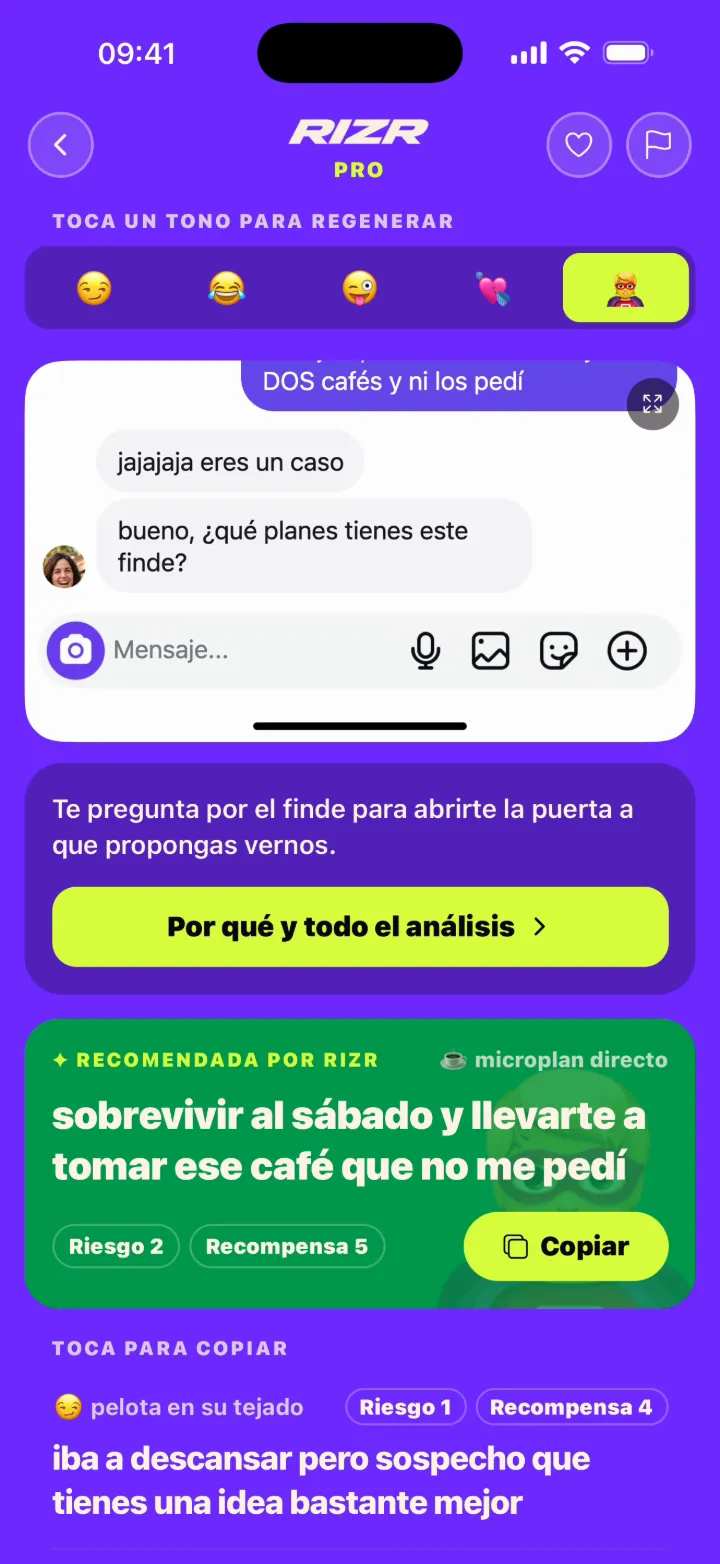
Con RIZR subes la imagen del chat y la IA propone varias respuestas en distintos estilos — Comedia, Vacile o Salvada Épica para reabrir. El matiz específico de Snapchat: la captura desde la propia app genera aviso, así que la mayoría fotografía la conversación con otro móvil antes de subirla. RIZR no se conecta a tu cuenta, no envía mensajes en tu nombre y trata cada imagen como dato privado.
Cómo escribir en Snapchat paso a paso
Entra por la historia, no por el chat frío
Responder a una historia con algo concreto (“¿dónde es eso?”, una broma sobre lo que sale) es la puerta natural. Un chat frío sin contexto en Snapchat lee raro, sobre todo si vienes de Quick Add.Alterna snaps y chats con intención
Los snaps (fotos) mantienen presencia y son ligeros; los chats (texto) construyen conversación de verdad. Solo snaps = colega de racha. Solo texto = intensidad. La mezcla es lo que liga.Cuida la racha sin convertirla en obligación
La racha (streak) crea contacto diario automático, que es oro para ligar. Pero si tus snaps de racha son el techo de tu casa cada día, eres un número, no una persona. Mete contenido real de vez en cuando.Recuerda que los mensajes desaparecen
El chat se borra al leerse (salvo que se guarde manteniendo pulsado). Eso da libertad para un tono más suelto, pero también significa que no puedes releer: si algo importa, díselo claro o guárdalo de mutuo acuerdo.No hagas capturas sin pensar
Snapchat notifica a la otra persona cuando capturas su snap, su chat o su historia. Antes de guardar nada, asume que lo va a saber. Para consultar una conversación con calma, mejor foto con otro móvil.Sube el nivel fuera del ciclo de snaps
Cuando haya ritmo diario y risas, propón algo que rompa la rutina: videollamada, plan en persona o al menos una conversación de verdad por chat. La racha sola no se convierte en cita por acumulación.
Aperturas que funcionan en Snapchat
Copia, personaliza con un detalle real del perfil o del chat, envía. Sirven de plantilla, no de copia-pega literal.
Vale, necesito saber dónde es esto porque mi lista de sitios pendientes acaba de crecer. ¿Recomendación real o solo salía bien en cámara?
Para copiarEso tiene una pinta ilegal. ¿Sitio secreto o me lo vas a decir y arriesgarte a encontrarme allí?
Para copiarEsa canción en la historia te delata: o muy buen gusto o muy mal momento. ¿Cuál de las dos?
Para copiar[Snap de lo que estás haciendo] + “tu historia me ha dado envidia, así que te enseño mi versión cutre del mismo plan”.
Para copiarPrometí no ser de los que agregan y nunca hablan, así que aquí estoy cumpliendo. ¿Qué tal acabó lo de anoche?
Para copiarSnapchat insiste en que nos conozcamos (culpa del Quick Add y de [amigo en común], supongo). Le voy a hacer caso: ¿de qué conoces tú a [amigo]?
Para copiarEl reloj de arena nos está juzgando. Salvo la racha pero con condición: hoy me cuentas algo mejor que la foto del techo.
Para copiarHe visto tu historia de [detalle] y me ha recordado que teníamos una conversación pendiente. Retomo yo, pero la siguiente te toca a ti.
Para copiarErrores que matan el chat en Snapchat
La mayoría de conversaciones no mueren por falta de química, sino por mensajes vagos, presión o cambios bruscos de tono.
Playbook por etapa en Snapchat
Mismo chat, distinto momento. Cada etapa pide otro tipo de mensaje.
| Etapa | Objetivo | Ejemplo |
|---|---|---|
| Apertura (historia) | Entrar con contexto real: comentar algo concreto de su historia, no un “🔥” suelto. | “Esa historia en [sitio] necesita explicación: ¿plan improvisado o llevaba semanas en la agenda? Lo pregunto por pura envidia.” |
| Primeros días | Alternar snaps ligeros y chats con sustancia; arrancar racha sin nombrarla. | “[Snap de tu plan] + “esto está a un 6 de 10, tu historia de ayer me subió el listón. ¿Qué haces tú hoy?”” |
| Mid-chat | Pasar del intercambio de snaps a conversación real con preguntas y bromas internas. | “Vale, ya tenemos racha y broma interna, esto va en serio. Pregunta de nivel dos: ¿plan perfecto de sábado sin mirar el móvil?” |
| Subir nivel | Romper el ciclo de snaps con una propuesta: videollamada o plan en persona. | “Llevamos [X] días de racha y aún no sé cómo suena tu voz. Videollamada de 10 minutos esta semana y comprobamos si eres tan graciosa fuera del chat.” |
| Salvada | Reabrir tras días de silencio usando su historia como percha, sin drama. | “Tu historia de hoy me ha dado la excusa que necesitaba para volver: ¿eso era [detalle]? Porque tengo opinión y creo que la quieres oír.” |
Tonos RIZR recomendados para Snapchat
Cada app pide otra energía. En RIZR eliges tono antes de generar; con los estilos disponibles cubres desde abrir hasta cerrar una cita.
ComediaPRO
Que se ría de algo de este chat
Snapchat es la app menos solemne que existe: el humor visual y las bromas sobre historias y rachas son su idioma nativo.
VacilePRO
Pique juguetón de ida y vuelta
Vacilar con lo que sube a sus historias o con sus snaps de racha es el flirteo estándar de Snapchat — juego, no crítica.
Salvada ÉpicaPRO
Reabre un chat muerto
Las conversaciones en Snapchat mueren y renacen constantemente; una salvada con percha en su última historia reabre sin parecer necesitado.
Preguntas frecuentes sobre Snapchat
Dudas comunes sobre cómo escribir, usar IA y mover el chat sin sonar artificial.
¿Snapchat avisa si hago una captura de pantalla?
¿Qué son las rachas y por qué importan para ligar?
¿Snap o chat: qué uso para flirtear?
¿Qué es el snap score y dice algo de mí?
¿Los mensajes de Snapchat desaparecen de verdad?
¿RIZR funciona con capturas de Snapchat?
Sigue leyendo
Artículos y guías relacionadas para resolver el siguiente paso.
 GuíaQué escribir en Instagram DMLa otra red social donde se liga por historias; dinámicas parecidas con reglas distintas.
- BlogCapturas de pantalla en apps de citasQué apps avisan y cuáles no — Snapchat es la gran excepción y aquí está el detalle.
- BlogCómo saber si le gustas por chatLas señales de interés, traducidas al idioma de snaps, rachas y respuestas a historias.